
Security & trust
Case management data security, in plain language
This page is written for two readers: the board member who asks whether client data is safe, and the funder whose security questionnaire wants specifics. Here is how Need Navigator protects the people in your records. Every claim is scoped to exactly what it covers, and the limits are stated out loud.
Your agency's data lives alone
Isolation is the first decision everything else builds on.
One agency, one instance
Each agency runs its own copy of the application with its own private database. Your data shares a system with nobody. There is no shared multi-tenant database at all.
Impossible by construction
Cross-tenant queries are impossible by construction. A bug or a bad filter in another agency's system cannot touch your records, because your database is not connected to theirs.
Hosted on AWS
Instances run on AWS (Amazon Web Services) behind a load balancer, infrastructure your IT committee will already recognize from its own questionnaires.
Secrets kept separately
Per-agency secrets are managed in AWS Systems Manager Parameter Store, each agency's separately.
Encryption and backups, scoped exactly
Security pages love the word "encrypted." We use it carefully.
Two encryption claims, each scoped to exactly what it covers: client data is encrypted at rest on the application server, and backups are encrypted in transit (TLS) and at rest (AES-256).
The backup record, line by line:
- Automated backups of every client database run nightly.
- Backups are stored off-site in redundant cloud storage (AWS S3, designed for 99.999999999% durability).
- Every backup run is automatically verified for restorability, and its success or failure alerts our team immediately.
- Backups are retained on a rolling schedule: 35 days of daily backups, 13 months of monthly archives.
- Backups are maintained in multiple independent locations.
- Backup copies are protected against deletion from the production server: the server's credentials cannot delete or overwrite backup history.
Where a stronger-sounding word would need an asterisk, we leave the word out.
Who sees what is your call
Access is granted by role, scoped by record, and controlled by your agency, not by us.
Nearly 80 granular permissions
Role-based access control (RBAC) means staff hold roles, and roles carry permissions: create, manage, and view rights per module, nearly 80 in all, assigned through an admin screen to roles your agency defines.
Record-level visibility
Notes, documents, folders, goals, visits, needs, referrals, and reports each carry their own visibility: everyone, the same program, or selected teams. A sensitive note can be held tighter than the record it sits on.
Field-level control in forms
Inside the form builder, individual fields can be limited to specific teams or users for editing, so a form that passes through many hands only changes in the right ones.
Support access, restricted
When our team needs to see what you see for support, admin impersonation is restricted to designated super-users.
Sign-in that fits your agency
From a five-person shelter to an agency already running single sign-on, the front door adapts.
Passwords with rules
Password sign-in enforces complexity rules and supports forced changes when staffing or policy demands it.
SAML single sign-on
SAML single sign-on (SSO) connects Need Navigator to the identity provider your organization already uses (one identity provider per agency).
Passkeys
Passkeys (WebAuthn) are supported, so staff can sign in with the device in their hand instead of a password.
Two-factor, per user
Each user can add two-factor authentication (2FA) to their account: a one-time code from an authenticator app (TOTP) or a code sent by email.
IP access modes
Choose your agency's mode: open access; an allowlist of approved IP addresses only; the allowlist plus a 2FA-verified override for remote staff; or SSO-only.
Bot protection that fails open
Cloudflare Turnstile screens sign-in, password reset, and public registration against bots. It is designed to fail open, so an outage on Cloudflare's side never locks your staff out.
Underneath all of it: HTTPS on all traffic, secure cookies, server-side sessions, and passwords and one-time codes stored hashed.
Audit trail & access monitoring
Every action logged. Unusual access flagged.
Access control decides who can open a record. The audit trail proves who did.
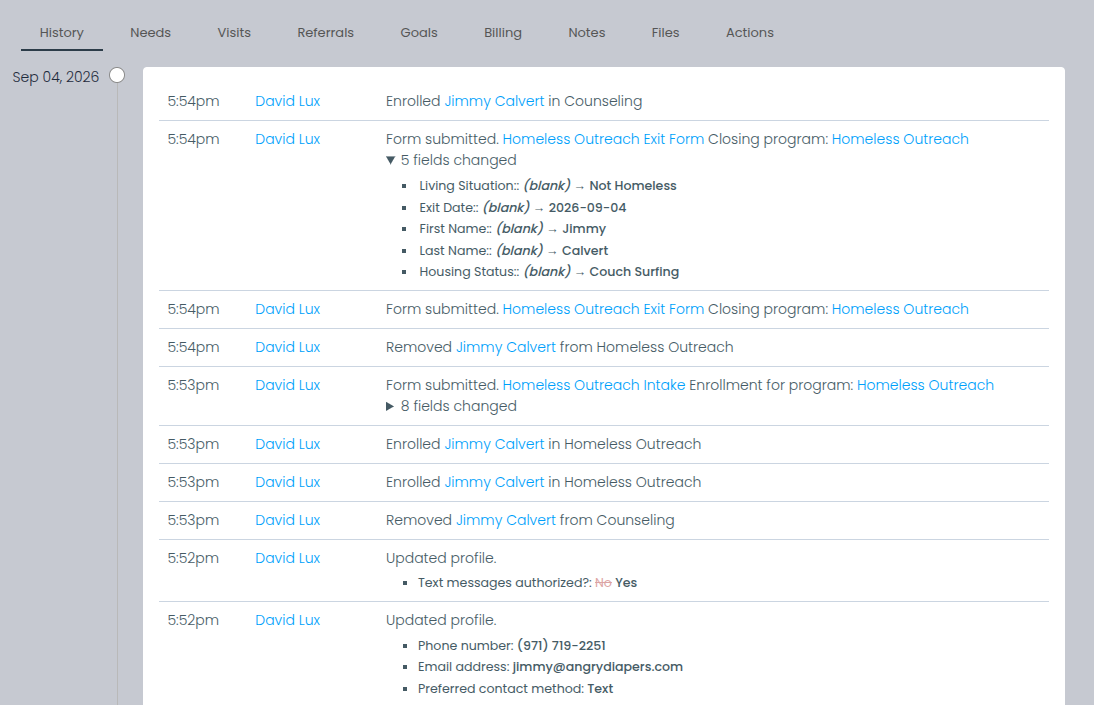
Need Navigator automatically logs every create, update, and delete across the system and renders them as a readable, permission-gated history timeline on each client. And every client-record view by agency staff is logged too: who, when, from which IP address, on what device.
Eight toggleable monitoring rules
Turn on the ones that fit your agency. Each screens staff access for patterns worth a second look:
- Repeated views of one clientthe same record opened again and again by one user.
- Unusually many clients in a dayfar more records than that user's normal working day.
- Unusually many clients in a minutefaster than anyone actually reads case files.
- Access outside assigned programsviewing clients the user's programs do not serve.
- Night-hours accessactivity at hours when the office is dark.
- Sudden spikes against a 30-day baselinea jump measured against the user's own recent pattern.
- Return after long inactivitya quiet account that abruptly starts reading records.
- Sequential record walkingpaging through client records one after another, in order.
Flagged activity lands in an administrator resolution queue, cleared one at a time or in batches, and access logs export to CSV so a funder's security question gets a file rather than a promise.
This is the machinery of a HIPAA-style minimum-necessary review. HIPAA (the Health Insurance Portability and Accountability Act) expects staff to access only the records their role requires, and the access log and flag queue let you review exactly that. We say "HIPAA-style" deliberately: compliance with a named framework is a legal determination for your counsel, not a claim software should make for you.
Questions boards and funders ask
Who can see a client's data?
Only the people your agency decides can see it. Role-based access control (RBAC) provides nearly 80 granular permissions assigned to roles your agency defines, individual records such as notes, documents, and needs can be scoped to everyone, one program, or selected teams, and forms support field-level edit permissions. Every client-record view is also logged, so "who can see" is always backed by "who did see."
What does the audit trail record?
Every create, update, and delete across the system is logged, and every view of a client record by agency staff is logged with the user, the time, the IP address, and the device. Eight toggleable rules screen that record-view activity for suspicious patterns, such as night-hours access or unusually many records viewed in one day, and flagged activity queues for administrator resolution. Access logs export to CSV for auditors and funders.
Where does our agency's data live?
On your agency's own instance of Need Navigator with its own private database, hosted on AWS (Amazon Web Services) behind a load balancer. There is no shared multi-tenant database, so cross-tenant queries are impossible by construction. Another agency's system cannot query your database. Per-agency secrets are managed in AWS Systems Manager Parameter Store.
What exactly is encrypted?
Two scoped claims: client data is encrypted at rest on the application server, and backups are encrypted in transit (TLS) and at rest (AES-256). The application does not additionally encrypt individual PII columns (personally identifiable information such as Social Security numbers) inside the database, which is why we state the scope instead of rounding it up. An encryption claim that names its scope is the kind worth trusting.
How are backups handled?
Every client database is backed up automatically every night to redundant, encrypted cloud storage. Each run is verified for restorability, with success or failure alerting our team immediately, and backups are retained for 35 days (13 months for monthly archives) in multiple independent locations, protected against deletion from the production server's credentials. Because backups run nightly, the honest recovery point is up to 24 hours.
Bring the security questionnaire
Send it ahead or bring it to the demo. We will answer it line by line, in writing, the same way this page does: specific and scoped.