
Client records
The whole person, on one page
Client records software for human services has one job: when someone sits down at your desk, show the whole picture. Need Navigator keeps each person your agency serves on one configurable page (alerts, insurance, income, care team, and program history), with duplicate prevention at the front door and every next step one tap away.
The one-page dossier
Alerts, insurance, income, care team, relationships, and program enrollments up top; tabs for history, needs, visits, referrals, goals, billing, notes, and files below. A radial quick-action menu on every profile creates a visit, referral, need, goal, task, billing record, note, or field location log in one tap.
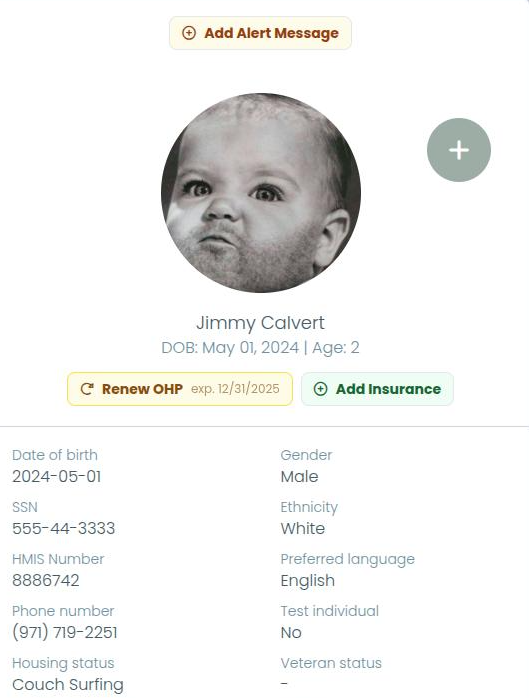
Inside the client record
Fields your agency chooses
Choose which profile fields appear on the create, edit, view, and list screens, and which are required. The record adapts to your intake practice rather than the other way around, with no custom development.
Demographics your funders ask about
Race, ethnicity, gender, language, education level, veteran status, current and prior housing status, disability with multiple conditions supported, income, and insurance. Recent additions include pronouns (off by default), a domestic-violence-survivor flag, and an expected-member flag for anticipated household members such as an unborn child.
A photo that lines itself up
Add a client photo by file upload or webcam. Live face detection helps line up the shot. A photo on the record helps front-desk staff confirm they are talking with the right person.
Search that finds the right person
Search by name, date of birth, phone, Social Security number, or HMIS (Homeless Management Information System) number. The matched text is highlighted in the results, so staff can see why each record came back.
Duplicates stopped at the door
Exact duplicates (the same name and date of birth, or the same HMIS number) are blocked at save. A fuzzy matcher also warns about likely duplicates before a new record is created, so the question gets asked while the person is still at the desk.
Merge, when one slips through
Consolidate two records onto one survivor: case history, submissions, program history, and documents all move together. No side-by-side retyping, no lost paperwork.
Test records for safe training
Flag any record as a test individual and it disappears from lists, searches, and reports by default. Each user can opt in to see them. Train new staff and run demos without polluting real data.
Data freshness you can stand behind
Set a review interval on any profile field and the system tracks when each value was last confirmed. A count of clients due for review sits right in the menu, staff re-verify a value without editing it, and each user chooses the scope of their own review alerts.
On the same record
Three companions to the individual record, and the logging behind all of it.
Alerts staff can't miss
Colored banner alerts pinned to the top of the record, visible the moment it opens: safety notes, reminders, expiring notices. Each carries a custom color and icon, an expiration date, and an order, and entry is fast because the most recently used style pre-fills.
Insurance with the card attached
Store each policy with provider, member ID, group number, plan type, and coverage dates, plus front and back card images by photo or PDF, merged into a single PDF for viewing or printing. The primary policy is managed automatically, renewals pre-fill from the prior policy, and coverage dates feed billing validation.
Releases of information, household-wide
Record a release of information (ROI) with its expiration date and the signed document attached. A client is covered if they or their head of household holds a current release. Coverage follows the current head of household automatically, so members are covered without re-entering the release.
Every view of the record, logged
Every profile view by agency staff is logged (who, when, from where) and screened by configurable suspicious-access rules that flag unusual patterns for administrators to review. Read how it works in the security overview.
Questions agencies ask about client records
How does duplicate prevention work?
Exact duplicates are blocked when a record is saved: the same name and date of birth, or the same HMIS (Homeless Management Information System) number. A fuzzy matcher also warns staff about likely duplicates before a new record is created. If one slips through anyway, two records can be merged, with case history, submissions, program history, and documents consolidated onto the surviving record.
What does data freshness tracking do?
Your agency sets a review interval on any profile field, and the system tracks when each value was last confirmed. A count of clients whose data needs review appears right in the menu, and staff can re-verify a value without editing it. Each user chooses the scope of their own review alerts.
Can we control which fields appear on the client record?
Yes. Each agency chooses which profile fields appear on the create, edit, view, and list screens, and which are required, without custom development. The record adapts to your intake practice rather than the other way around.
Can staff train in the system without touching real client data?
Yes. Any record can be flagged as a test individual, which excludes it from lists, searches, and reports by default, so training and demos never pollute real data. Each user can opt in to see test records when they need them.
Do releases of information cover the whole household?
A release of information (ROI) is recorded per client with its expiration date and the signed document attached. A client is covered if they or their head of household holds a current release, and coverage automatically follows the current head of household, so household members are covered without re-entering the release. It is deliberately simple: one active release per client.
See a record shaped like your intake
Bring your current intake packet to the demo, and we will map your fields onto the record and show the duplicate catch as it happens.