
For food banks & community aid
Keep the line moving, and the record complete
Food pantry client tracking software earns its keep on distribution day. Need Navigator checks returning neighbors in with a tap, builds new households from a single form without re-typing, logs what each household received, from food boxes to utility help, and closes the loop on referrals to your partners.
Built for distribution day and everything after
Six jobs a food bank or pantry runs every week, and how Need Navigator handles them.
Check-in without re-typing
Find a returning client by name, date of birth, or phone, with matched text highlighted. New applications are classified as an exact match, probable match, or new individual, and staff confirm or create in one click. Exact duplicates are blocked at save, a fuzzy matcher warns about likely ones, and if a duplicate slips through anyway, a merge consolidates both records' history onto one.
One stop records the household
Clients group into typed households with a head of household and member relationships, and one visit can include the whole family. A single entry records the household's stop. A family application builds every member through a guided stepper, and when an address changes, staff are prompted to copy it across selected members in one step.
A catalog of everything you distribute
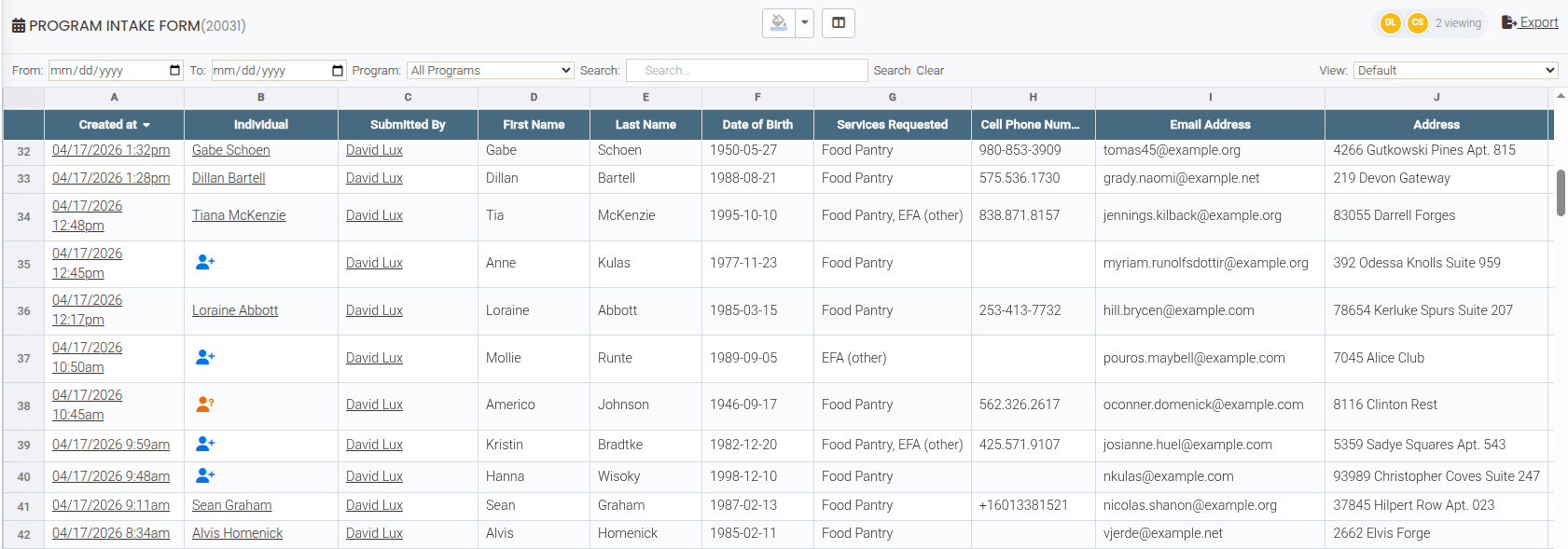
Your agency defines its own catalog of resources, financial or non-financial, and every distribution is logged against it with a type and quantity. Requests move through a clear status ladder that staff can update right from the live grid, and a smart button records your standard distribution in one tap: the visit and the request together, pre-filled.
Referrals your partners actually complete
Refer a neighbor to a partner from a directory that knows each organization's services, areas served, hours, and languages spoken. The printed referral carries a QR code the receiving provider scans (no login needed) to record who received the client and their feedback, completing the loop with a timestamp. Message threads attach to each referral for follow-up.
Food drives and volunteer days
Publish an event page with the schedule, location, and capacity; people register online inside the window you set, with duplicate-registration prevention, and ticketless events take a free name-and-email signup. On the day, staff check people in by QR code, register walk-ins, and mark no-shows.
The numbers behind the food
Built-in breakdowns show resources distributed and demographics by race, ethnicity, gender, language, and ZIP code: the shape of your service area, straight from the records staff already made at check-in. Build your own reports across clients, households, visits, needs, and referrals, export to Excel, and schedule delivery so the board packet is done before anyone asks. Per-report redaction levels keep sensitive identifiers out of shared copies.
Questions food banks ask
How fast is check-in on a busy distribution day?
Returning clients come up by typing a few letters of a name, a date of birth, or a phone number, with matched text highlighted. A smart button your agency configures records the standard distribution (the visit and the food-box request together, pre-filled) in one tap. New applicants' forms land in a live grid where a matching engine ranks likely existing records, so staff confirm a match or create the person in one click instead of re-typing.
Does it track households or individuals?
Both. Each person has their own record, and records group into typed households with a head of household and member relationships. One visit can include multiple clients, so a single entry records the whole household's stop, and a family application can match or create every member in one guided pass.
Can it track distributions that aren't money?
Yes. Your agency defines its own catalog of resources, financial or non-financial: food boxes, hygiene kits, diapers, utility help. Each request is logged against it with a type and quantity. Reports then show resources distributed, alongside demographic breakdowns by race, ethnicity, gender, language, and ZIP code.
How do referrals to partner agencies work?
You keep a directory of partner organizations with their services, areas served, hours, and languages spoken, and refer a client to a specific organization and contact. The printed referral carries a QR code; the receiving provider scans it, no login needed, and records who received the client and their feedback, which completes the referral with a timestamp. If a partner also runs Need Navigator, your agencies can opt in to send referrals directly between systems.
See a Saturday run through it
Bring your busiest distribution morning to the demo. We will check in a returning household, build a new one from a single form, and print a referral with its loop-closure QR code.