
Reports & dashboards
The report your funder wants, on the day it is due
Funder reporting software for nonprofits should know your deadlines. Need Navigator's report builder spans eleven record types, redacts identifiers for board-ready exports, sends everything to Excel, and delivers on schedules like "the 3rd Tuesday of the month" by email, in-app message, or both.
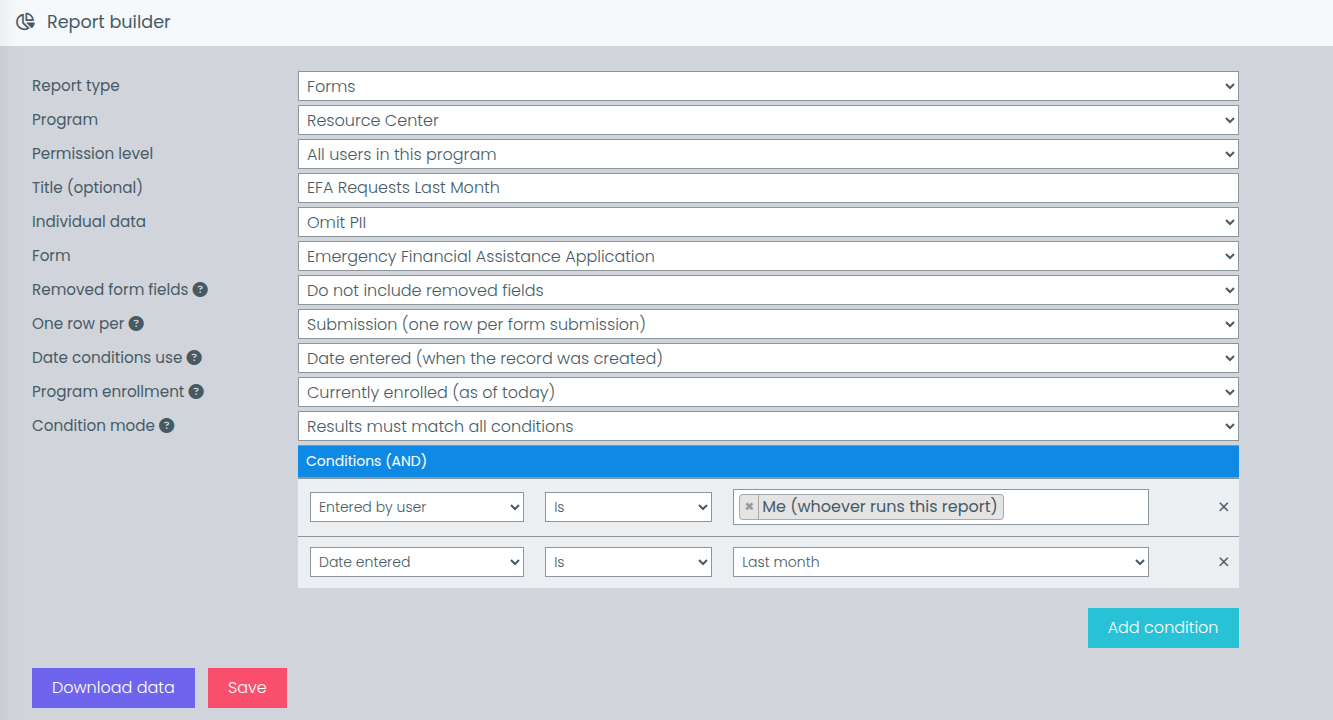
Build the report you actually need
Pick a record type, choose columns, stack filters, save the definition. Everything else on this page starts from that.
Eleven record types, one builder
Clients, households, visits, needs, referrals, goals, forms, events, reservations, billing, and funders. Pick your columns, stack condition filters (programs, exit reasons, shelters, users, date ranges, and more), and save the definition.
Board-ready without the identifiers
Every saved report carries a PII (personally identifiable information) redaction level, so the export you hand a board or an outside audience shows totals and breakdowns, not sensitive identifiers.
Excel, everywhere
Every report type exports to Excel. Beyond reports, Excel export runs across roughly sixteen record types platform-wide, from clients and visits to billing batches and location logs.
Charts where a picture helps
Form reports draw bar and pie charts that download as PDF, the right shape for a one-page handout at a staff meeting or in a board packet.
The money questions, pre-wired
Built-in analytics cover spending by program, resources distributed, funds remaining by funder, and requests over time. A funder report aggregates funding-pool spending by calendar year.
Demographic breakdowns
Break results down by race, ethnicity, gender, language, and ZIP code: the cross-sections most funder reports are built from, there to support your funder reporting.
Delivery that knows your deadlines
Schedule any saved report weekly or monthly (including patterns like the 3rd Tuesday or the last Friday) at a chosen time, delivered by email, in-app message, or both.
A library, not a junk drawer
Saved reports live in a library grouped by program, with reordering and batch management. Each definition carries its own visibility level: everyone, same program, or selected teams.
A straight answer on funder formats
You deserve a plain answer here: Need Navigator does not ship pre-built templates for named federal reports, and we do not make compliance claims.
What it gives you is the material those reports are made of. The data model is HMIS-adjacent; HMIS is the Homeless Management Information System, the record-keeping standard many housing funders expect. The builder, the demographic and spending breakdowns, and Excel export on every report type are designed to support your funder reporting. You assemble what your funder asks for once; after that, it is a saved definition on a schedule.
Dashboards for the day, and for the program
A personal landing page of your open work, and a shared widget board for the metrics your team watches.
Start the day on one page
The home dashboard gathers your upcoming visits, goals with step progress, needs (including a pending-approval queue), referrals, events, unread messages, and a client search, with a toggle between "mine" and "everyone."
Counts that are to-do lists
Sidebar counts track needs awaiting action, pending referrals, today's visits and reservations, and open tasks and goals. Each one links straight to the filtered list it represents.
A widget board per program
The configurable program dashboard is a drag-and-drop widget board: recent clients, funding-pool balances with health indicators, client search, and embedded Quick Forms views. Everyone in the program shares the board; editing is permission-gated.
Query tables you define
Build your own tables over a curated data catalog (visits, needs, and class outcomes among them), choosing columns, filters, and sort. Date presets include fiscal year, because that is how grants count.
Questions we hear about reporting
Can Need Navigator produce my funder's report?
You assemble it, and then it repeats itself. Need Navigator does not ship pre-built templates for named federal reports, and we do not make compliance claims. What you get is a builder that spans eleven record types with condition filters and Excel export on every one, an HMIS-adjacent data model (HMIS is the Homeless Management Information System, the record-keeping standard many housing funders expect), and built-in demographic and spending breakdowns that support your funder reporting. Build the report once, save the definition, and schedule it.
What does PII redaction do?
PII is personally identifiable information: the details that tie a row of data to a specific person. Every saved report carries its own redaction level, so an export headed for a board packet or an outside audience does not carry sensitive identifiers, while a caseworker's working version of the same report keeps the detail they need. You set the level per report, not system-wide.
How does scheduled delivery work?
Choose weekly or monthly delivery, including calendar patterns like the 3rd Tuesday or the last Friday of the month, plus a time of day, and whether the report arrives by email, in-app message, or both. Each delivery runs the saved definition against current data, so the numbers that arrive are the numbers as of that morning.
Who can see which reports and dashboards?
Each saved report definition carries its own visibility level: everyone, the same program, or selected teams. The report library is grouped by program, so people find what belongs to their work. Program dashboards are shared by everyone in the program, and editing the widget board is permission-gated. Access to the client data underneath is governed by Need Navigator's role-based permissions.
What exports to Excel?
Every one of the eleven report types exports to Excel, and Excel export runs platform-wide across roughly sixteen record types: clients, households, visits, needs, referrals, goals, tasks, events, reservations, billing batches, form submissions, and location logs among them. Charts on form reports download as PDF, and on-screen report views are paginated for a quick check before you export.
Bring your hardest funder report
Bring last quarter's spreadsheet to the demo. We will rebuild it in the report builder, set a redaction level, and schedule it for the day it is due.