
Form builder & multilingual forms
Ask exactly what your program needs to know
Nonprofit form builder software should put program staff in charge of the questions. In Need Navigator, your team builds its own intake and case-management forms, with conditional logic, repeatable sections, and fields wired to the live client record, and offers them in Spanish, drafted by AI and polished by your bilingual staff.
What the form builder does
Built in the browser, by your staff
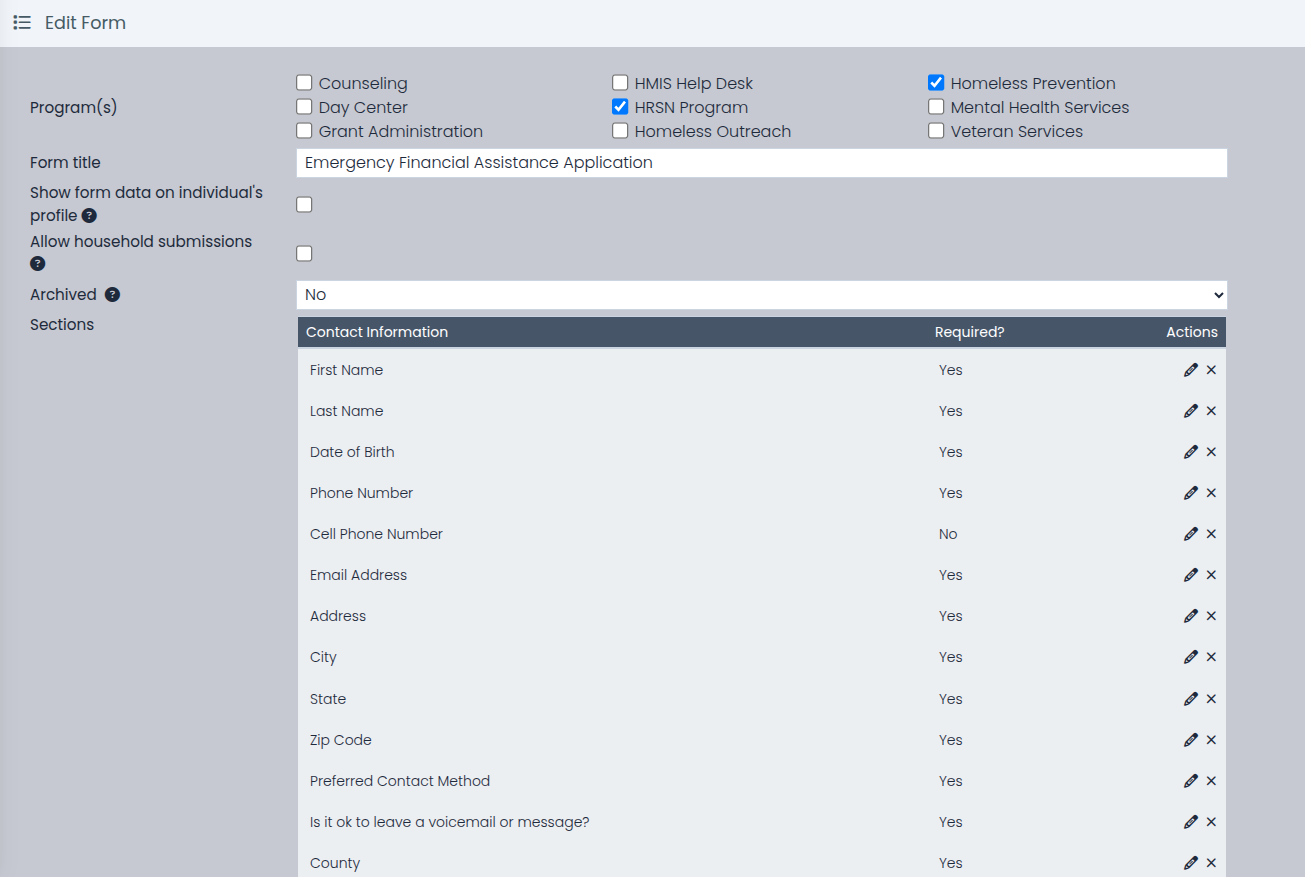
Short and long text, dates, times, numbers with precision control, email, radio buttons, checkboxes with an "other" option, dropdowns. Sections and fields drag into order, and per-field edit permissions by team or user decide who can change an answer.
Fields wired to the real record
Live client-record fields read and write the actual client record: name, address, phone, date of birth, Social Security number, HMIS (Homeless Management Information System) number, demographics, income. Lookup fields pull from funding pools, schools, class offerings, and staff.
Logic on fields and whole sections
Show or hide a single question, or an entire section, based on earlier answers. The form stays short for the person with a simple situation and complete for the one whose situation is complicated.
"Add Another," built in
Repeatable sections capture households as they actually are: one section for a household member or an income source, repeated as many times as the family needs.
A picture on any question
Attach a helper image to any field (where to find the account number on a utility bill, what a completed example looks like) so the form explains itself to the person filling it out.
Attached where the work happens
Forms attach to programs as intake and exit forms, to visit reasons, to resources, and to smart buttons. A form cannot be archived while anything still depends on it, and the System Form Locations screen shows administrators every place a form is in use.
Spanish in one click, then a human pass
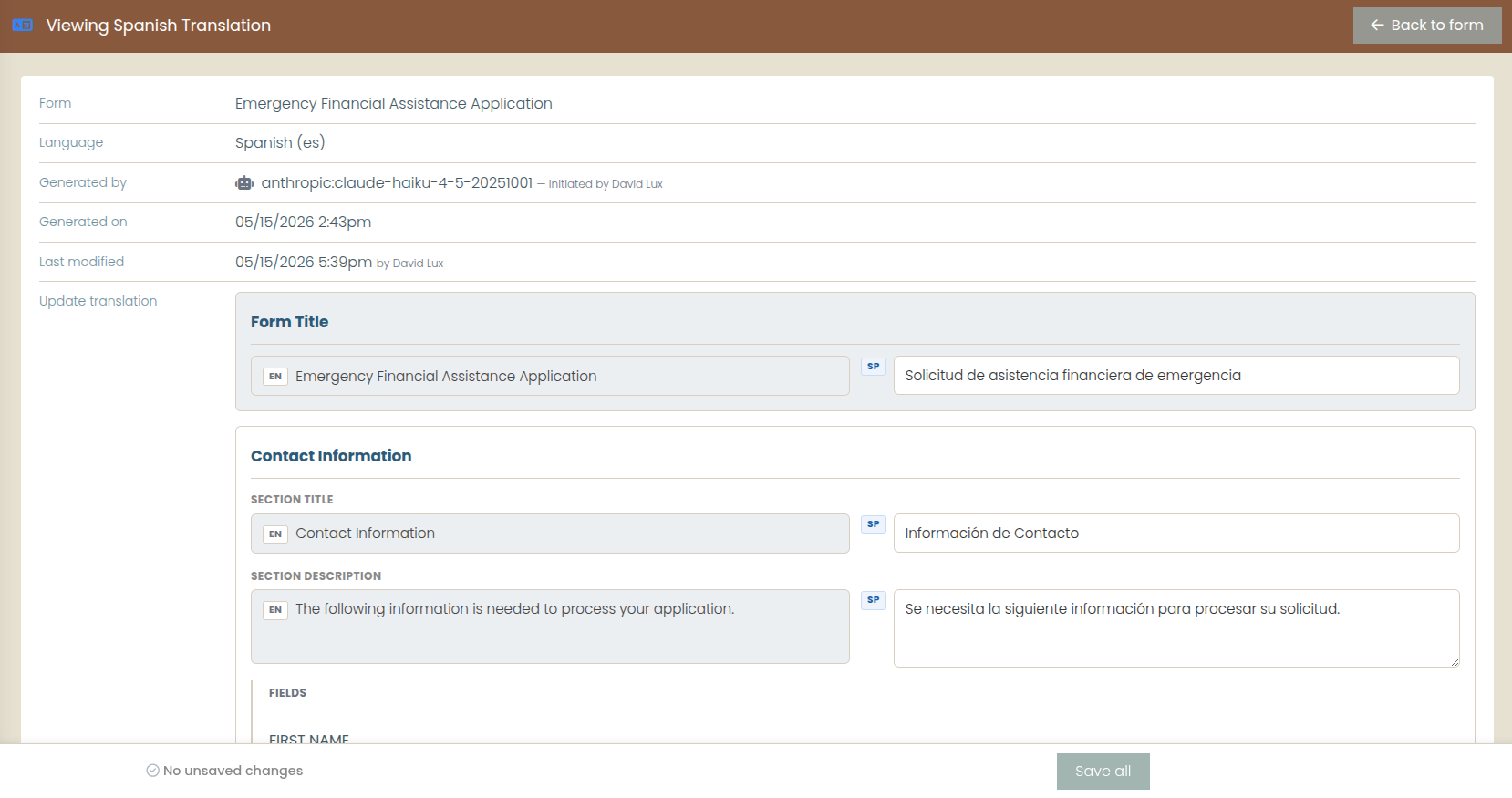
An AI drafts the full translation in seconds; bilingual staff refine it form by section by field by option. Each language version tracks when its baseline was generated and when a person last hand-edited it. One of exactly two AI features in the product.
Forms that travel
Deep-copy a form in place to adapt it for a new program. Export a whole form design, translations included, and import it into another Need Navigator system with internal references remapped automatically (an administrator operation today).
Questions agencies ask
Do we really not need a developer to build forms?
Right. Staff with the right permission build forms in the browser: add sections and fields, set what is required, drag everything into order, and attach the finished form to a program, visit reason, or smart button. When a question needs to change, the person who runs the program changes it. A System Form Locations screen shows administrators everywhere a form is in use before they change or retire it.
Can questions appear or disappear based on earlier answers?
Yes. Conditional show-and-hide works on individual fields and on whole sections, so a follow-up section can appear only when an earlier answer calls for it. Repeatable sections handle the "add another" cases (household members, multiple income sources) without padding the form with blank copies.
What does the AI translation do, and what does it not do?
One click drafts a complete Spanish baseline for a form: title, sections, field labels, helper text, and answer options. The draft is written at an approachable reading level, with program and organization names preserved. It does not replace review: bilingual staff polish the draft in a side-by-side editor, and each language version records when its baseline was generated and when a person last edited it. Form translation is one of exactly two AI features in Need Navigator; there is no AI chat or summarization.
If a client fills out the Spanish version, what happens to our reporting?
Nothing changes. Stored answer values stay in English behind the scenes, so conditional logic, reports, and exports behave identically whichever language the form was completed in. The public intake portal renders the form in the visitor's language, English or Spanish today.
Can we reuse a form, or move it to another Need Navigator system?
Within your own system, staff can deep-copy any form and adapt the copy. A form design (sections, fields, options, and translations) can also be exported and imported into another Need Navigator system, with internal references remapped automatically. Today that import is an administrator operation handled with our team rather than a self-service screen.
Bring your longest paper form
We will rebuild a piece of it live in the demo: conditional sections, household fields, and a Spanish draft before the call ends.