
Intake management
Intake your whole team can work at once
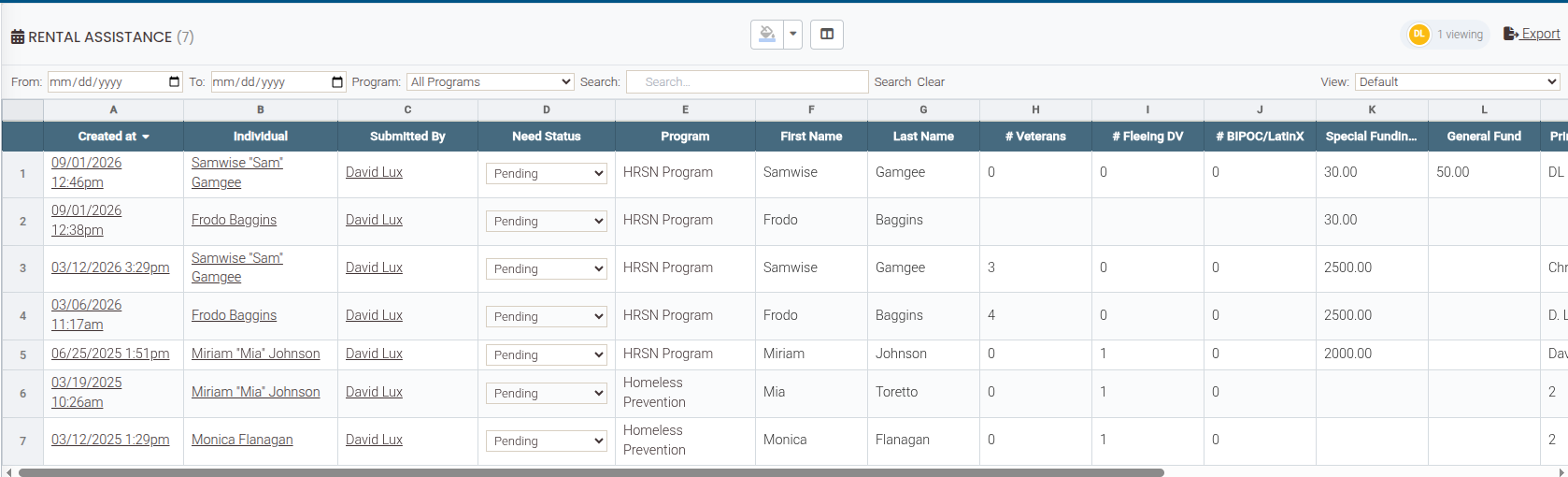
Nonprofit intake management software should end the re-keying, not just move it. Need Navigator gives your team a live submissions grid everyone can work in at the same time, where edits, colors, and statuses land for every viewer as they happen. It pairs that with a matching engine that turns each submission into the right client record, or a whole household, without typing any of it twice.
What the intake workspace does
One grid, the whole team
Cell-level presence shows who is editing what, and inline edits land for every viewer the moment they happen: updates are pushed, not polled. It is real-time collaboration on live case data, so the queue never has to be divided up by email.
Arrange it once, for everyone
Resize columns, drag them into a new order, and color rows and columns to flag what matters to your team. Layout and color changes sync live to everyone viewing the grid.
Saved views the team shares
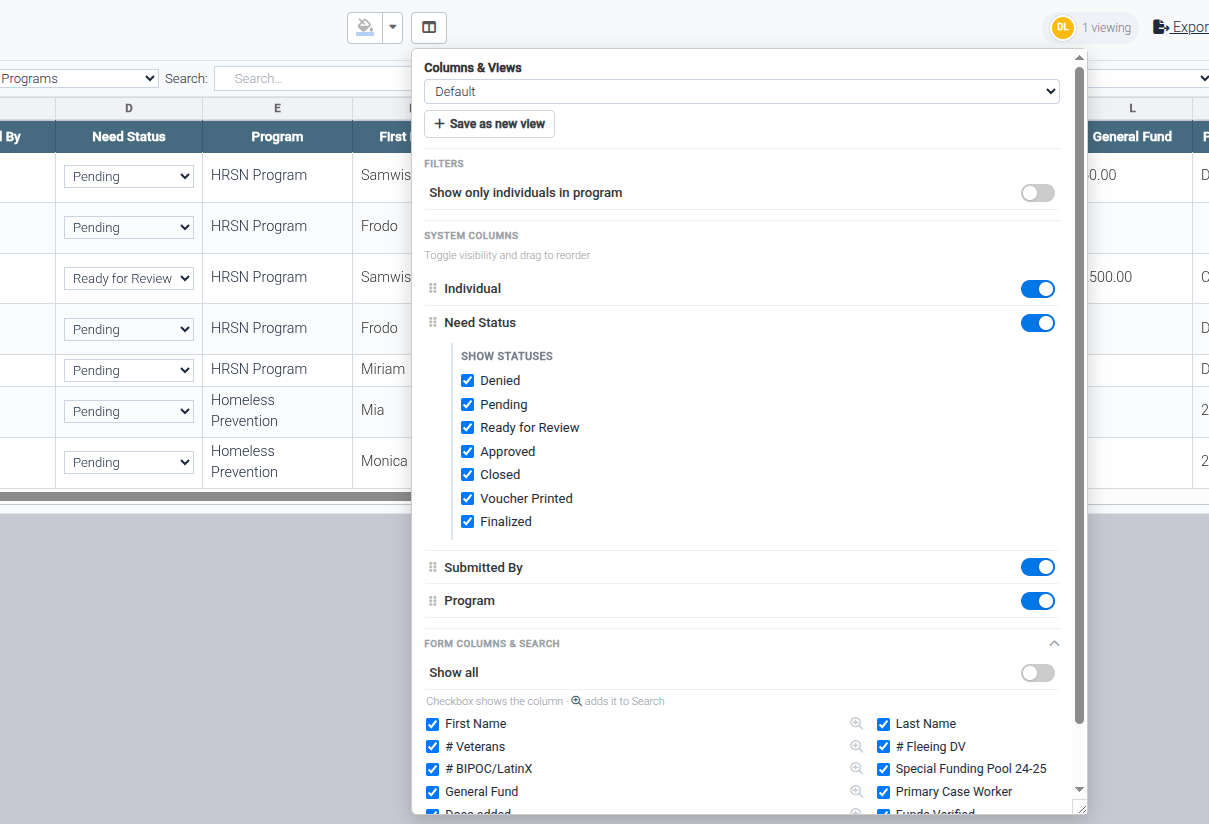
Name a combination of column order and visibility, status filter, and sort. Then share a default view for the whole team. Monday's reviewer sees exactly what Friday's reviewer saw.
Built for volume
Large forms load incrementally, so the workspace stays fast as submissions pile up. A unified search box plus filters by date, client, submitter, program membership, and status cut the pile down to the rows you need.
A review queue, built in
Each row shows the status of its linked assistance request: Pending, Ready for Review, Approved. Staff update it inline without leaving the grid. Supervisors get a clear approval queue inside a workspace the team is already in.
Exact, probable, or new
The matching engine classifies every incoming submission using name, date of birth, and signals like Social Security number or HMIS (Homeless Management Information System) number, then ranks the likely candidates. Staff confirm a match or create the person in one click: fewer duplicates, no re-typing.
One application, a whole household
When one submission collects several people (a family application), a guided stepper matches or creates each member, designates the primary member, and builds the household with everyone attached in one pass. Income for more than one household member can arrive from that same submission.
Where staff already look
Program intake submissions surface on the client's profile automatically, and any form can be shown there with a per-form toggle. Embed a form's grid on a program dashboard as a widget, and the day starts with the queue already on screen.
Questions intake teams ask
How does matching prevent duplicate client records?
Every incoming submission is classified as an exact match, a probable match, or a new individual, using name, date of birth, and signals like Social Security number or HMIS (Homeless Management Information System) number. For probable matches, staff pick from a ranked list of candidates instead of guessing; for new people, one click creates the record from the submission. Nothing links automatically without staff review, so the person deciding is always looking at the evidence.
What happens when one application covers a whole family?
A guided household-capture stepper walks through the submission one person at a time, matching or creating each member, designating the primary member, and building the household with everyone attached, in one pass. A single family application can even carry income details for more than one household member. You get a complete, connected household from one form, not five disconnected records.
Who sees edits while the team is working the grid?
Everyone with the grid open. Edits, row and column colors, layout changes, and status updates are pushed to every viewer in real time, with no refreshing. Cell-level presence shows who is editing what, so teammates can steer around each other instead of working the same row. It works like a shared spreadsheet, except every row is wired to your client records.
Can the grid really serve as our review queue?
Yes. The status shown on each row is the linked assistance request's status (Pending, Ready for Review, Approved, and so on), and staff can update it inline without leaving the grid. Filter to one status, save that as a shared view, and your review queue is a bookmark.
Do intake submissions show up on the client's profile?
Program intake submissions surface on the client's profile automatically, and any other form can be shown there with a per-form toggle. A form's grid can also be embedded on a program dashboard as a widget, so the queue is visible where the team already starts the day.
See a submission become a client
Bring one of your intake forms to the demo, and we will run a submission through the grid, match it, and build a household while you watch.