
Programs, Smart Buttons & Automations
Run each program your way, down to the dropdowns
Program enrollment software for nonprofits should hold a program's whole design, not just its name. In Need Navigator, every program carries its own intake and exit forms, folders, eligibility rules, and wiki. Smart Buttons turn the front desk's multi-step routines into one tap, and no-code automations handle the follow-through.
What a program carries
Define it once; every enrollment after that inherits the setup.
The whole setup, attached to the program
Each program holds its own intake and exit forms, default document folders that are created the moment a client enrolls, visit reason and topic requirements, and a program wiki where the staff reference lives.
Eligibility rules you build yourself
Combine income thresholds tied to the federal poverty level (FPL) or area median income (AMI) with age ranges and required-field or field-value rules on core client fields: veteran status, insurance provider, disabling condition, housing status. Clients show as eligible or partially eligible, with no custom development.
Enrollment episodes, not just a checkbox
Every enrollment is an episode with entry and exit dates and a record of who enrolled and who exited the client. Exit reasons are agency-defined and grouped into categories you choose. At a shelter check-out, an exit reason can fire automations, including closing the enrollment.
A homepage for every program
Enrollment counts, average enrollment duration, retention rate, a six-month enrollment trend, resources distributed, dollars disbursed, and activity totals across visits, needs, goals, tasks, and referrals, plus embedded task lists and a live program-wide message thread.
Smart Buttons: a whole intake in one tap
Admins compose them; the front desk just taps.
Compose the sequence once
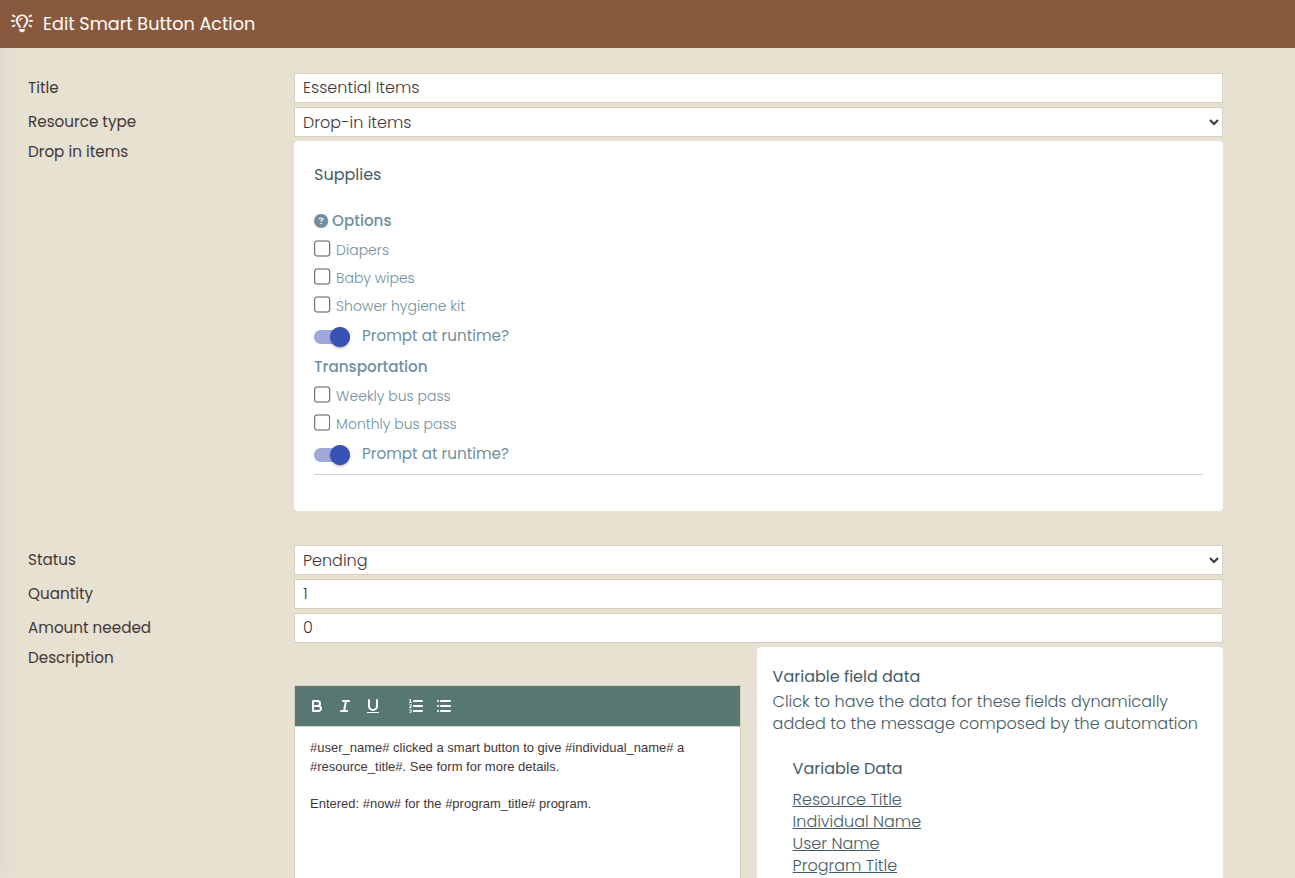
A button is a sequence of create-a-need, create-a-referral, and create-a-visit actions, executed in the order you add them, with pre-set field values, template variables like client name, program, and date, and forms embedded right in the flow.
Blanks ask at click time
Anything you leave unset can prompt the worker when they tap, so one button covers the everyday case and still handles today's exception without a workaround.
The bookkeeping comes out identical
Billing records and funding-pool allocations are created exactly as they would be by hand. That is consistency without retraining: a new hire's records look like a veteran's.
Easy to spot, easy to reach
Give a button a color and icon or a short text abbreviation, mark your favorites, and land on the created record the moment the sequence finishes.
Automations: the follow-through, handled
No-code rules that react to casework the moment it happens.
Triggers where the work happens
Attach a rule to a resource, a form, a referral reason, a visit reason, or an exit reason. It fires when the record is created, or when a specific field changes to the value you define.
Actions that close the loop
Send a templated email with variables and optional attachments, create a task, post a message to the need's thread, or enroll a client in a program (or close their enrollment) from a visit or a shelter check-out.
Your vocabulary, maintained by you
The Settings hub keeps the language of your data in your agency's hands.
No vendor request to change a dropdown
A searchable admin Settings hub lets your permissioned staff maintain demographic answer sets (race, ethnicity, gender, language, housing status, veteran status, disability, education level, insurance providers, relationships) and operational vocabularies like document types, event types, and organization types.
Defaults that follow each person
Every staff member sets their own workflow defaults (default visit duration, message-delivery delay, review-alert scope, and calendar view), so the system opens the way each person actually works.
Questions program directors ask
Who can change a dropdown or an answer list?
Your own permissioned staff, through a searchable admin Settings hub. Demographic answer sets (race, ethnicity, gender, language, housing status, veteran status, disability, education level, insurance providers, relationships) and operational vocabularies such as document types, event types, and organization types are all maintained by your agency. No vendor request is needed to change a dropdown.
What can an automation actually do?
An automation is a no-code rule attached to a resource, form, referral reason, visit reason, or exit reason, and it fires when a record is created or when a specific field changes to a value you define. It can send a templated email with variables and optional attachments, create a task, post a message to the need's conversation thread, or enroll a client in a program, or close their enrollment, from a visit or a shelter check-out. Staff set these up in admin screens, not in code.
How do exit reasons and automations work together?
Exit reasons are defined by your agency and grouped into categories you choose, so the record of why people leave is kept in your own terms. An automation attached to an exit reason acts the moment the exit is recorded. At a shelter check-out, for example, it can close the client's program enrollment, send a templated email, or create a follow-up task. The paperwork and the follow-through stay consistent no matter who records the exit.
Can we build eligibility rules without a developer?
Yes, that is the point of the rule builder. You combine income thresholds tied to the federal poverty level (FPL) or area median income (AMI) with age ranges and required-field or field-value rules on core client fields such as veteran status, insurance provider, disabling condition, and housing status. Clients then show as eligible or partially eligible for the program, with no custom development involved.
What is an enrollment episode?
Each stretch a client spends in a program is its own episode, with an entry date, an exit date, and a record of who enrolled and who exited them. Because episodes are kept as history, someone who returns next year starts a new episode instead of overwriting the old one. Program statistics like retention rate, average enrollment duration, and the six-month enrollment trend live on the program's homepage.
Bring your messiest intake
In the demo, we will compose it into a Smart Button together: the same steps your team runs today, pre-set into one tap that comes out the same every time.