
Needs & emergency assistance
A clear path from request to voucher
Emergency assistance tracking software has two jobs: show where every request stands, and show whose dollars are paying for it. Need Navigator moves each request up a clear approval ladder, ties every dollar to a funding pool with a real balance, and prints the eligibility math right on the voucher.
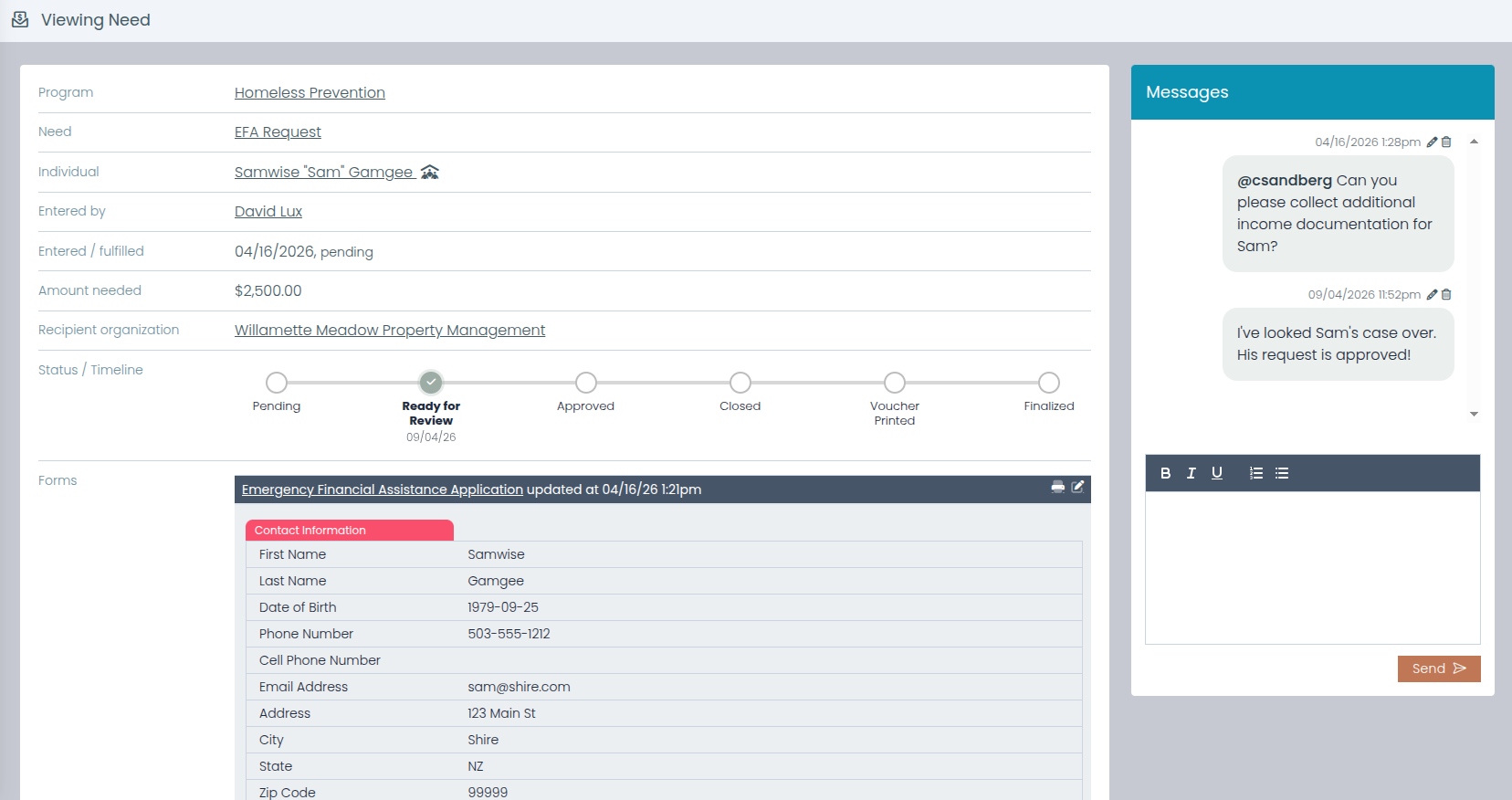
What the assistance module does
A catalog of what you give
Log a need against your agency's own catalog of resources, financial or non-financial, with need types, quantity, amount, and the organization that gets paid. The catalog is yours to define, in your agency's vocabulary.
A ladder every request climbs
Pending → Ready for Review → Approved → Finalized → Voucher Printed, with Denied and Closed as off-ramps. Anyone can see where a request stands, and every status change lands in the audit trail.
Funding pools with real balances
Budgets tied to funder organizations or programs carry balances, date ranges, and per-need allocations, so knowing what is left in the county grant takes a glance, not an afternoon of spreadsheet work.
Split one request across funders
A single request can draw from several pools at once, and the system warns when the allocations do not add up to the request amount. Mismatches surface now, not at reporting time.
Eligibility math, printed where it counts
The printable voucher shows household size, recent household income, the program's maximum allowed income, and an under-or-over-limit verdict. The income is pulled automatically from a tracking window your agency configures.
Disbursements, tracked honestly
Each financial need carries a payment record: attach the invoice PDF, email it to the payee straight from the system, and track sent and finalized status. There is no check printing or bank-transfer integration; your finance process stays yours, and the record stays complete.
A review queue that moves
Supervisors can work approvals right from the Quick Forms submissions grid. Each row shows its linked request's status, updates inline, and changes appear for the whole team in real time.
The follow-through is automatic
Automations can send an email, create a task, or post to the request's message thread when a status changes (an approval, a denial), and billing records can be generated from the need's types without separate data entry.
Questions agencies ask
Can one request be paid from more than one funding pool?
Yes. Funding pools are budgets tied to funder organizations or programs, each with its own balance and date range, and a single request can be split across several pools at once. The system warns when the allocations do not add up to the request amount, and funder-level spending and remaining balances are there for reporting.
What prints on the voucher?
The voucher carries the request details and the eligibility math behind the decision: household size, the household's recent income pulled from a tracking window your agency configures, the program's maximum allowed income, and a clear under-or-over-limit verdict. A funder or auditor can see why the request qualified without ever opening the software.
How do supervisors review and approve requests?
Every request climbs a status ladder (Pending, Ready for Review, Approved, Finalized, Voucher Printed, with Denied and Closed as off-ramps), so the review queue is always explicit. The ladder ships that way and your agency can rename it: an administrator sets each status's label, color, and order, switches off the ones you never use, and limits a status to particular resources, while automations and saved reports keep working. Supervisors can also update status inline from the Quick Forms submissions grid, where changes appear for the whole team in real time. Every status change is recorded, on the request as a timeline and in the audit trail.
How are payments actually made?
Need Navigator prepares and tracks the payment; it does not move the money. There is no check printing, bank-transfer integration, or online payment. Staff attach the invoice PDF to the disbursement, email it to the payee directly from the system, and track its sent and finalized status while your finance office issues payment the way it already does.
Can we track help that isn't money?
Yes. The resource catalog holds financial and non-financial resources alike, so a box of food, a bus pass, or a car seat is logged with the same need types and quantities as a rent payment. Non-financial needs simply skip the payment record.
Walk a request end to end
Bring a real scenario (a rent shortfall, a shut-off notice), and we will take it from intake through review, the funding split, and the printed voucher.