
Households & care teams
The whole household, and everyone helping them
Household tracking software for social services has to match how people actually live: in families whose addresses, answers, and income belong together. Need Navigator groups clients into typed households that stay in sync, maps the relationships between them, and puts a full care team on every client. When a worker leaves, the caseload moves in one operation and the history stays.
What households and care teams do
Households with a shape
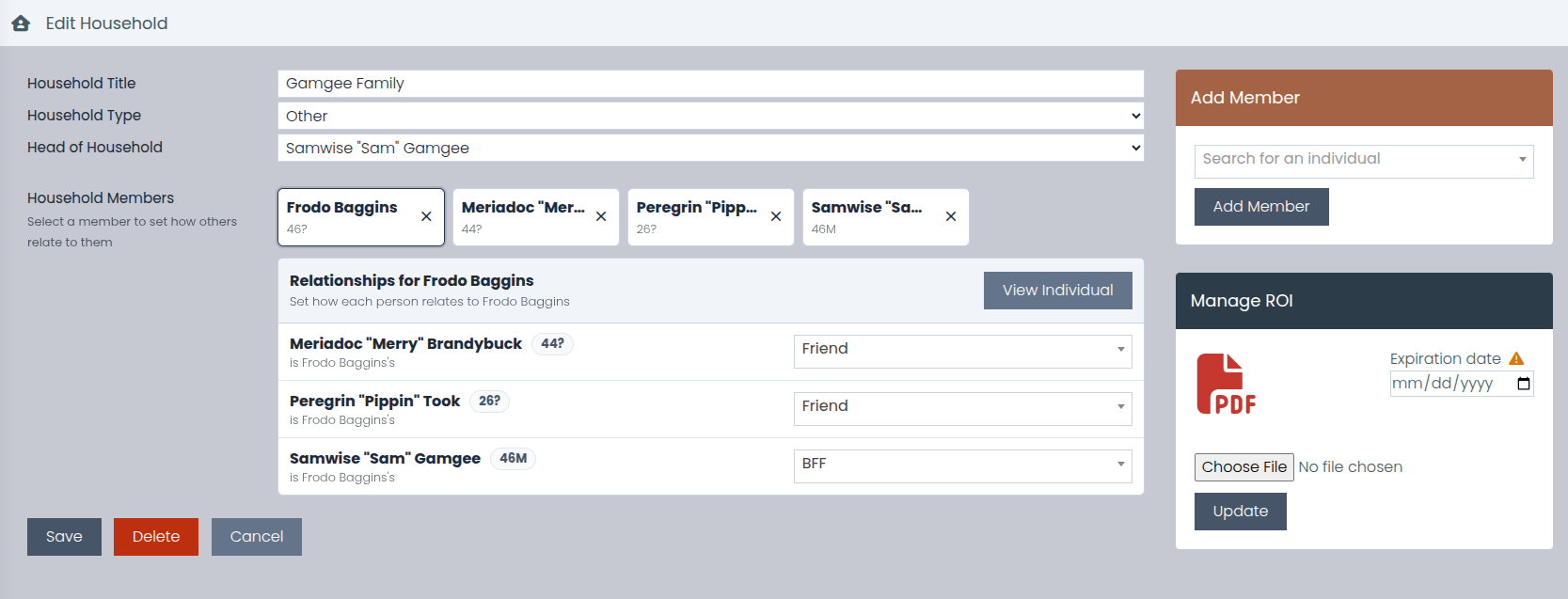
Group clients into typed households with a designated head of household, so income, addresses, and everyday casework can treat the family as one unit instead of a list of disconnected individuals.
Relationships, mapped
A member-to-member relationship matrix records how everyone is connected, including relationships that extend outside the household, so the grandparent across town stays on the map.
One move, one update
When a member's address changes, staff are prompted to copy the new address, phone, and housing status to the household members they select. One step, no member-by-member re-entry.
Answers that follow the family
Form answers marked "sync across household" copy between household members' submissions and pre-fill new ones. A family's tenth form should not start from zero.
Income that adds itself up
Household income rolls up automatically for program eligibility, and a minor's income is counted only where a program's rules say so. The math is ready before anyone reaches for a calculator.
The whole care team, on the record
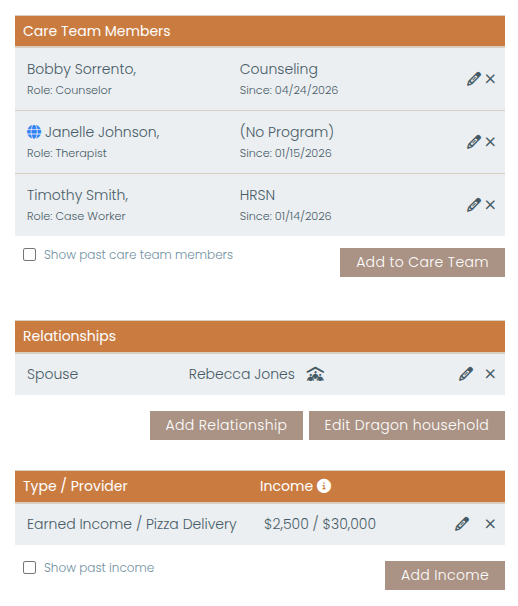
Each client can have multiple care-team members at once: your own staff or a contact at a partner organization, each with a role, a program, and start and end dates.
A directory that knows who does what
Browse every assignment with filters for program, role, provider type, and status, plus summary counts. Roles are agency-defined and tied to your staff teams, so role dropdowns only offer people who actually hold that role.
Turnover without dropped clients
Reassign a departing worker's entire active caseload (or just one program's worth) to another worker in one operation. Ended assignments are kept as history, never erased.
Questions agencies ask
When a family moves, do we update every member's record separately?
No. Update one household member's address, and Need Navigator prompts you to copy the new address, phone, and housing status to the household members you select: one step, and you stay in control of exactly who it applies to. Form answers marked to sync across the household travel the same way, copying between members' submissions and pre-filling new ones.
Can someone outside our agency be on a client's care team?
Yes. A care-team member can be your own staff or a contact at a partner organization (a school or another agency you work with), and every assignment carries a role, a program, and start and end dates. That means the people actually involved in a case are on the record together, not scattered across sticky notes.
What happens to a caseload when a worker leaves?
A supervisor reassigns the departing worker's entire active caseload, or just one program's worth of it, to another worker in one operation. The old assignments are ended and kept as history, never erased, so every client's record still shows who worked with them and when.
How does household income work for program eligibility?
Household income rolls up automatically, so eligibility is evaluated against what the whole household brings in, not just the applicant. A minor's income is counted only where a program's rules say it should be. The rollup is what program income thresholds, set by federal poverty level (FPL) or area median income (AMI) and household size, are checked against.
See a household come together
Bring a family scenario to the demo, and we will build the household, map the relationships, and move a caseload from one worker to another in one operation.